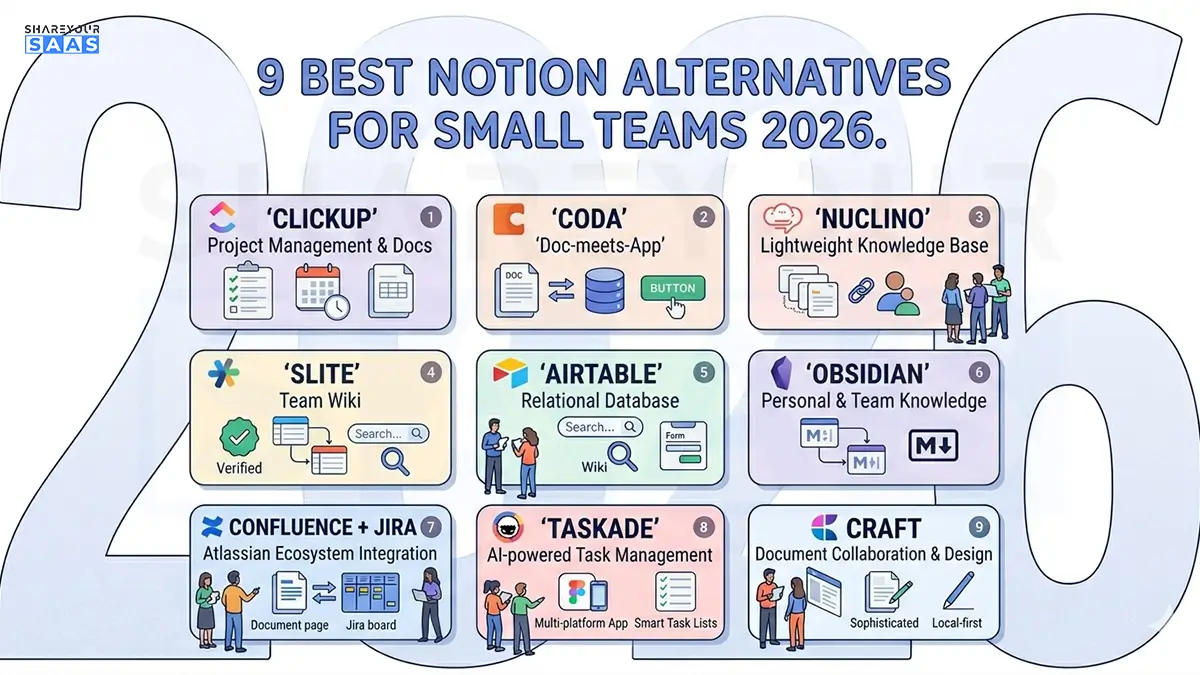
The best Notion alternatives for small teams in 2026 are ClickUp and Coda for project-heavy work, Nuclino and Slite for simple knowledge bases, and Airtable for database-driven teams. The right pick depends on which Notion feature your team actually relies on — docs, tasks, or databases — not on which tool has the most features.
If your team started on Notion and slowly fell out of love with it, you are in good company. Most small teams pick Notion because it does everything. Then six months later, the same “does everything” nature becomes the problem. Pages load slowly. New hires spend their first week just figuring out where things live. And nobody can agree on how to structure a single workspace.
I have helped dozens of small teams set up their workspace tools, and I have personally tested every option on this list. So this is not a recycled roundup pulled from other blogs. These are real observations about what actually works when a five-person team needs to get things done without fighting their software.
Let me walk you through the Notion alternatives for small teams that are genuinely worth your time in 2026 — and just as importantly, which one fits your specific situation.
Why Small Teams Outgrow Notion in the First Place
Before jumping to alternatives, it helps to know exactly what pushes teams away. If you can name your real frustration, you can pick a replacement that fixes it instead of trading one set of problems for another.
Here are the issues that come up again and again:
- Speed at scale: Once your databases cross a few thousand rows, Notion starts to lag. Pages that should open instantly take five to ten seconds.
- Steep learning curve: Notion’s blank-canvas flexibility means new team members configure workspaces instead of doing actual work.
- No offline access: If your internet drops, so does your access to everything.
- No built-in chat: Teams end up bouncing between Notion and Slack all day.
- Weak task dependencies: Notion handles light tasks fine, but real project management with dependencies and Gantt charts is not its strength.
This is the stage where most teams make a mistake. They look for the alternative with the longest feature list. The smarter move is to find the tool that nails the one thing your team uses most.
How I Tested These Notion Alternatives for Small Teams
To keep this honest, every tool here was judged on the same five things that actually matter for a small team:
- Ease of use — how fast a new person gets productive
- Free plan quality — is the free tier actually usable, or just bait?
- Collaboration — real-time editing, comments, and mentions
- Pricing — fair value for teams under 15 people
- Best-fit use case — the job it does better than Notion
No company paid to be on this list. The recommendations come from hands-on use and real user feedback from places like G2 and Capterra.
The 9 Best Notion Alternatives for Small Teams in 2026
1. ClickUp — Best for Project-Heavy Small Teams
If your team lived inside Notion’s task views and mostly ignored the wiki, ClickUp is the natural upgrade. It gives you real project management — dependencies, time tracking, Gantt charts, and multiple views — without the configuration headache.
- Best for: Teams that manage projects more than documents
- Free plan: Generous, with unlimited tasks and members
- Paid plans: Start around $7/user/month
- Watch out for: The feature density can feel overwhelming at first
In 2026, ClickUp’s AI-driven sorting and task automation have made it even more powerful for small teams that want to reduce manual busywork. If project management is your core need, this guide on product management with Monday.com CRM features is worth reading alongside this one to compare approaches.
2. Coda — Best for Teams That Love Notion’s Flexibility
Coda feels closest to Notion in spirit. It blends documents, tables, and apps into one surface, but it handles large datasets and automation more gracefully. Small teams that built mini-apps inside Notion will feel right at home.
- Best for: Teams that want Notion-style flexibility with better data handling
- Free plan: Solid for small teams
- Paid plans: Start around $10/user/month
- Watch out for: Slight learning curve, similar to Notion
3. Nuclino — Best for Simple, Fast Knowledge Bases
Nuclino is the opposite of feature bloat. It is fast, clean, and built for teams that just want to write things down and find them later. If your team’s workflow is simple and you are tired of Notion’s lag, this is a breath of fresh air.
- Best for: Small teams with simple documentation needs
- Free plan: Available with core features
- Paid plans: Around $6/user/month — one of the most wallet-friendly options
- Watch out for: Lacks complex databases and heavy project management
With a 4.7 rating on G2, Nuclino has earned a loyal following among teams that value speed over a long feature list.
4. Slite — Best for AI-Powered Team Documentation
Slite is built for teams that keep asking each other the same questions. Its standout feature is built-in AI that answers questions directly from your knowledge base, which cuts down on repeated “where is that doc?” messages.
- Best for: Small to mid-sized teams that want AI-assisted search
- Free plan: Up to 3 docs
- Paid plans: Start around $8/user/month
- Watch out for: Less flexible than Notion; no databases
5. Airtable — Best for Database-Driven Teams
If your team mostly used Notion as a database, Airtable does that job far better. It scales to tens of thousands of records without slowing down, and its automation and integration options are more mature than Notion’s.
- Best for: Teams managing complex data and workflows
- Free plan: More generous than most for small teams, including AI credits
- Paid plans: Start around $20/user/month
- Watch out for: Not built for long-form docs or wikis
6. Obsidian — Best for Individual Note-Takers and Privacy
Obsidian stores your notes as local files on your device. For teams that care about data ownership, offline access, and a connected web of notes, it is hard to beat — though it leans more toward individuals than full team collaboration.
- Best for: Privacy-focused users and personal knowledge management
- Free plan: Free for personal use
- Watch out for: Collaboration features are limited compared to cloud tools
7. Confluence + Jira — Best for Teams That Will Scale Fast
If you expect to grow quickly, the Atlassian combo of Confluence (docs) and Jira (project tracking) is one of the most reliable setups around. The two integrate tightly, so decisions documented in Confluence link straight to Jira tickets.
- Best for: Teams planning to scale beyond 15 people soon
- Free plan: Confluence free caps at 10 users
- Watch out for: More rigid and heavier than Notion; dated interface
8. Taskade — Best for AI-Powered Task Management
Taskade is an interesting middle ground. Its note-taking is lighter than Notion’s, but its automation and AI agents for workflows and projects are genuinely strong. Real-time collaboration and built-in chat make it practical for small remote teams.
- Best for: Small teams wanting AI automation plus lightweight project workflows
- Free plan: Available
- Watch out for: Documentation features are more limited than Notion
9. Craft — Best for Beautiful Documents on Apple Devices
Craft is built natively for Mac, iPad, and iPhone, with a web companion. If your team works on Apple hardware and cares about how documents look, Craft delivers polished typography and a writing experience that feels great.
- Best for: Apple-first teams that value design and writing quality
- Watch out for: Less powerful for databases or complex project management
Here’s a quick comparison of the best notion alternatives for small teams:
| 🛠️ Tool | 🎯 Best For | 🆓 Free Plan | 💰 Starting Price |
|---|---|---|---|
| 🔵 ClickUp | Project-heavy teams | 🟢 Generous | $7/user/mo |
| 🟣 Coda | Notion-style flexibility | 🟢 Solid | $10/user/mo |
| 🟢 Nuclino | Simple knowledge base | 🟢 Yes | $6/user/mo |
| 🟠 Slite | AI documentation | 🟡 3 docs only | $8/user/mo |
| 🔷 Airtable | Database workflows | 🟢 Generous | $20/user/mo |
| ⚫ Obsidian | Privacy & personal notes | 🟢 Free | Paid add-ons |
| 🔵 Confluence + Jira | Fast-scaling teams | 🟡 10 users | Varies |
| 🟣 Taskade | AI task management | 🟢 Yes | Affordable |
| 🟡 Craft | Apple-first teams | 🟡 Limited | Affordable |
🟢 = Strong Free Plan | 🟡 = Limited Free Plan | 💰 = Paid Plans Available
Fact-Check: What’s Actually True About Switching From Notion
A few claims float around the internet that deserve a reality check before you switch:
- “Notion is always slow.” Not quite. Notion is fast for small workspaces. The slowdown is real but mostly shows up with large databases of thousands of rows, as reported by multiple hands-on testers.
- “Free alternatives are just demos.” False for several tools here. Airtable, ClickUp, and Nuclino offer free tiers that small teams can genuinely run on, according to Airtable’s own comparison.
- “Switching tools fixes everything.” Only if you pick based on your real need. Migrating from Notion to a tool with the same weakness just moves the problem.
The honest takeaway: there is no single “best” Notion replacement. There is only the best fit for how your team works.
My Personal Advice: How to Actually Choose
After setting up these notion alternatives for small teams tools for real teams, here is the shortcut I give every founder who asks:
- You mostly tracked tasks? Go with ClickUp.
- You loved building mini-apps? Try Coda.
- You just wanted a fast wiki? Pick Nuclino or Slite.
- You leaned on databases? Airtable wins.
- You are scaling fast? Confluence and Jira will hold up.
Do not migrate everything in one weekend. Pick one team, run a two-week trial, and move your most-used workspace first. If it sticks, roll it out to everyone. This staged approach saves you from an expensive mistake and a frustrated team.
If you are still building out your full software stack, our guides on the best AI SaaS tools for small startups and what SaaS software actually is pair well with this one. And if you are early in your journey, how to start a SaaS company covers the foundational tooling decisions that shape everything later. For teams thinking about billing tools too, our breakdown of subscription management software is a useful next read.
Final Thoughts on Notion Alternatives for Small Teams
The best Notion alternative is the one that fixes your specific frustration, not the one with the longest feature list. Pick based on your core need — docs, tasks, or data — and trial it with one small team first. Switch deliberately, and your workflow gets faster instead of just different. For more honest SaaS tool comparisons like this one, browse our full SaaS reviews hub.
Frequently Asked Questions
What is the best free Notion alternative for small teams?
For most small teams, Nuclino and ClickUp offer the best free plans. Nuclino is ideal if you want a fast, simple knowledge base, while ClickUp suits teams that need real task and project management. Airtable’s free tier is the strongest choice for database-driven work.
Is there a Notion alternative that works offline?
Yes. Obsidian is the top choice for offline access because it stores all your notes as local files on your device. This also makes it appealing for teams that prioritize privacy and full data ownership over real-time cloud collaboration.
Why are small teams switching away from Notion in 2026?
The most common reasons are slow performance on large databases, a steep learning curve for new team members, no offline access, and no built-in chat. Teams that need speed, simplicity, or stronger project management often find a purpose-built tool fits better than Notion’s all-in-one approach.